

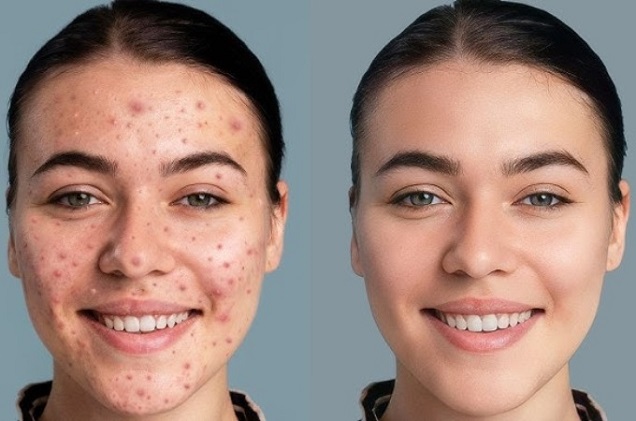
A strong portrait should still look unmistakably like the person in it. Good retouching removes temporary distractions—uneven lighting, a blemish, tired-looking skin—without reshaping the features that give a face its character. The aim is not perfection, but a cleaner, more balanced version of the original photo.
If you want a polished result without learning complex software, professional faceretouch can help refine a portrait while keeping it natural. The best approach is to choose only the corrections the image actually needs instead of changing every available detail.
Start With a Better Photo
Editing works best when the original shot is already strong. Soft daylight near a window is usually easier on the skin than direct flash or harsh overhead light. Turn slightly toward the light so the face has gentle shadows rather than looking flat.
Keep the camera a little farther from the face. Shooting from very close range can exaggerate the nose or forehead. A simple background also helps: fewer distractions mean less editing later and more attention on the expression.
Retouch What Distracts, Not What Defines You
Natural results come from selective corrections. Useful edits may include:
- softening temporary blemishes or redness;
- reducing strong under-eye shadows;
- balancing uneven skin tone;
- removing stray hairs;
- making small lighting corrections.
Freckles, smile lines, face shape, and natural skin texture often make a portrait feel personal. Removing every irregularity can make the result look unfamiliar, even when the edit is very smooth.
Keep Real Skin Looking Like Skin
Overediting is easiest to notice when skin loses all texture. Real skin has pores, fine lines, highlights, and subtle changes in tone. Heavy smoothing can erase those details and give the face a plastic effect.
Instead of blurring the whole face, focus on individual distractions. This matters even more in close-ups and profile pictures, where small details are easy to see. If one blemish or shadow is the only issue, correcting just that may be enough.
Make Each Edit Deliberate
When using an editing app, start with your strongest photo rather than trying to rescue a poorly lit shot. Choose the specific correction you need; avoid stacking changes just because they are available. A few targeted edits usually look more convincing than a long list of adjustments.
Match the Edit to the Photo
A travel photo and a professional headshot may need different levels of retouching. Before editing, decide what you want the viewer to notice. If the expression and mood already work, avoid changing features simply because the option exists.
The most convincing retouching rarely calls attention to itself. It keeps the eyes, expression, and personality in focus while quietly improving distracting details. A portrait can look fresher and more polished without losing the features that make it yours.