

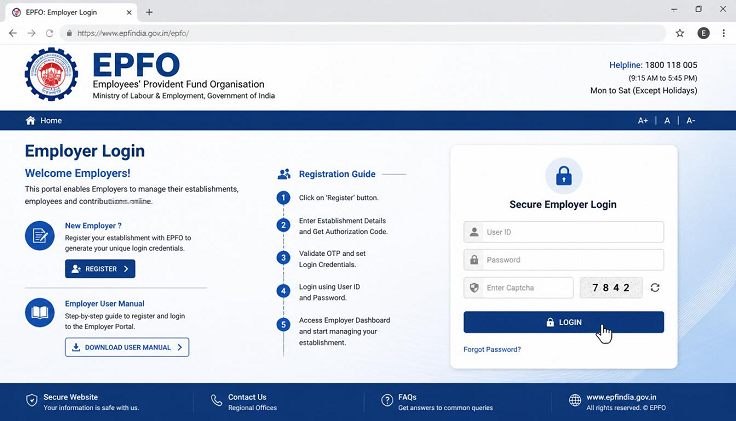
The EPFO employer login portal is an essential platform for organizations covered under the Employees’ Provident Fund (EPF) Scheme. It enables employers to manage employee provident fund contributions, generate UANs, file monthly returns, update employee information, and fulfill statutory compliance requirements. Understanding how to register and use the EPFO employer portal helps organizations efficiently manage their EPF responsibilities.
What is the EPFO Employer Login Portal?
The EPFO employer login portal is an online platform developed by the Employees’ Provident Fund Organisation for registered establishments. Through this portal, employers can complete various EPF-related activities without visiting EPFO offices.
The portal allows organizations to manage employee records, upload contribution details, submit Electronic Challan-cum-Return (ECR), approve claims where applicable, and monitor compliance with EPF regulations.
Employer Responsibilities Under EPF
Organizations covered under the EPF Act have several important responsibilities, including:
- Registering with EPFO
- Enrolling eligible employees
- Generating UAN for new employees
- Depositing monthly PF contributions
- Filing Electronic Challan-cum-Return (ECR)
- Maintaining employee records
- Updating employee information
- Ensuring compliance with EPFO regulations
Timely completion of these tasks helps employers avoid penalties and ensures employees receive their benefits.
Employer Registration Process
New establishments must complete EPFO registration before accessing the employer portal.
The registration process generally includes:
- Visiting the official EPFO website.
- Selecting the employer registration option.
- Providing establishment details.
- Entering PAN and business information.
- Uploading the required documents.
- Submitting the registration application.
- Completing verification by EPFO.
After successful verification, the establishment receives an EPFO registration.
Establishment Code
Once registration is approved, EPFO issues a unique Establishment Code.
This code is required for:
- Employer login
- Employee registration
- ECR filing
- PF contribution payments
- EPFO correspondence
Every registered establishment uses this code for future EPFO transactions.
Creating Employer Login Credentials
After receiving the Establishment Code, employers can create login credentials.
The process usually involves:
- Registering the establishment on the employer portal.
- Creating a username.
- Setting a secure password.
- Verifying the registered email address.
- Completing mobile verification.
Authorized representatives can then access the employer dashboard.
Employer Dashboard Overview
After logging in, employers can access a dashboard that provides important information, including:
- Total employees
- Active PF members
- Pending compliance tasks
- Recent contributions
- ECR filing status
- Notifications and alerts
The dashboard serves as the control center for all employer-related EPFO services.
Employee Management
The employer portal allows organizations to manage employee records efficiently.
Common functions include:
- Adding new employees
- Updating employee details
- Recording employee exits
- Correcting member information
- Managing salary details
Keeping employee records updated ensures accurate PF contributions and smooth claim processing.
UAN Generation
For employees who do not already have a Universal Account Number (UAN), employers can generate one through the employer portal.
The UAN remains the employee’s permanent PF identification number throughout their career, regardless of job changes.
After generation, employers should inform employees so they can activate their UAN and complete KYC.
Monthly PF Contribution
Employers are responsible for depositing monthly PF contributions for eligible employees.
The employer portal supports:
- Contribution calculation
- Salary uploads
- Employee-wise contribution details
- Monthly payment processing
Regular contributions ensure employees receive accurate retirement benefits.
Electronic Challan-cum-Return (ECR)
The Electronic Challan-cum-Return (ECR) is one of the most important services available on the employer portal.
Through ECR, employers can:
- Upload employee contribution details
- Generate challans
- Validate employee data
- Submit monthly returns
- Complete contribution payments
Timely ECR filing is essential for compliance with EPFO requirements.
Claim Management
The employer portal also assists in processing employee claims.
Employers can:
- Review claim requests
- Verify employee information
- Approve eligible claims where required
- Monitor claim progress
Digital claim processing has significantly reduced paperwork and processing time.
PF Transfer Requests
When employees change jobs, employers may receive transfer requests through the portal.
The employer portal enables organizations to:
- Verify transfer applications
- Approve transfer requests
- Submit necessary confirmations
- Monitor transfer status
Proper handling of transfers helps employees maintain continuous PF records.
Reports and Compliance
Employers can generate various reports through the portal, including:
- Contribution reports
- Employee-wise PF statements
- ECR history
- Payment summaries
- Compliance reports
These reports help organizations monitor statutory obligations and maintain proper records.
Digital Signature Certificate (DSC)
Certain employer services require authentication using a Digital Signature Certificate (DSC).
The DSC helps:
- Verify authorized signatories
- Secure online submissions
- Authenticate official transactions
- Improve document security
Employers should ensure that their DSC remains valid for uninterrupted portal access.
Grievance Management
The employer portal includes a grievance management system that enables organizations to respond to employee complaints regarding:
- Missing contributions
- Incorrect PF details
- Claim delays
- UAN issues
- Member information corrections
Prompt responses improve employee satisfaction and support regulatory compliance.
Multi-User Access
Large organizations often require multiple users to manage EPFO activities.
The employer portal supports role-based access, allowing separate permissions for:
- HR department
- Payroll team
- Accounts department
- Authorized signatories
- Compliance officers
This improves operational efficiency while maintaining account security.
Security Features
The EPFO employer portal includes several security measures, such as:
- Secure username and password login
- CAPTCHA verification
- Digital Signature authentication
- OTP verification for selected services
- Encrypted data transmission
These features help protect sensitive employer and employee information.
Conclusion
The EPFO employer login portal provides organizations with a complete digital platform for managing provident fund responsibilities. From employer registration and UAN generation to ECR filing, employee management, claim processing, and compliance reporting, the portal simplifies every major EPFO function. By understanding its features and regularly using the employer portal, organizations can fulfill their statutory obligations efficiently while ensuring employees receive accurate and timely provident fund benefits.