

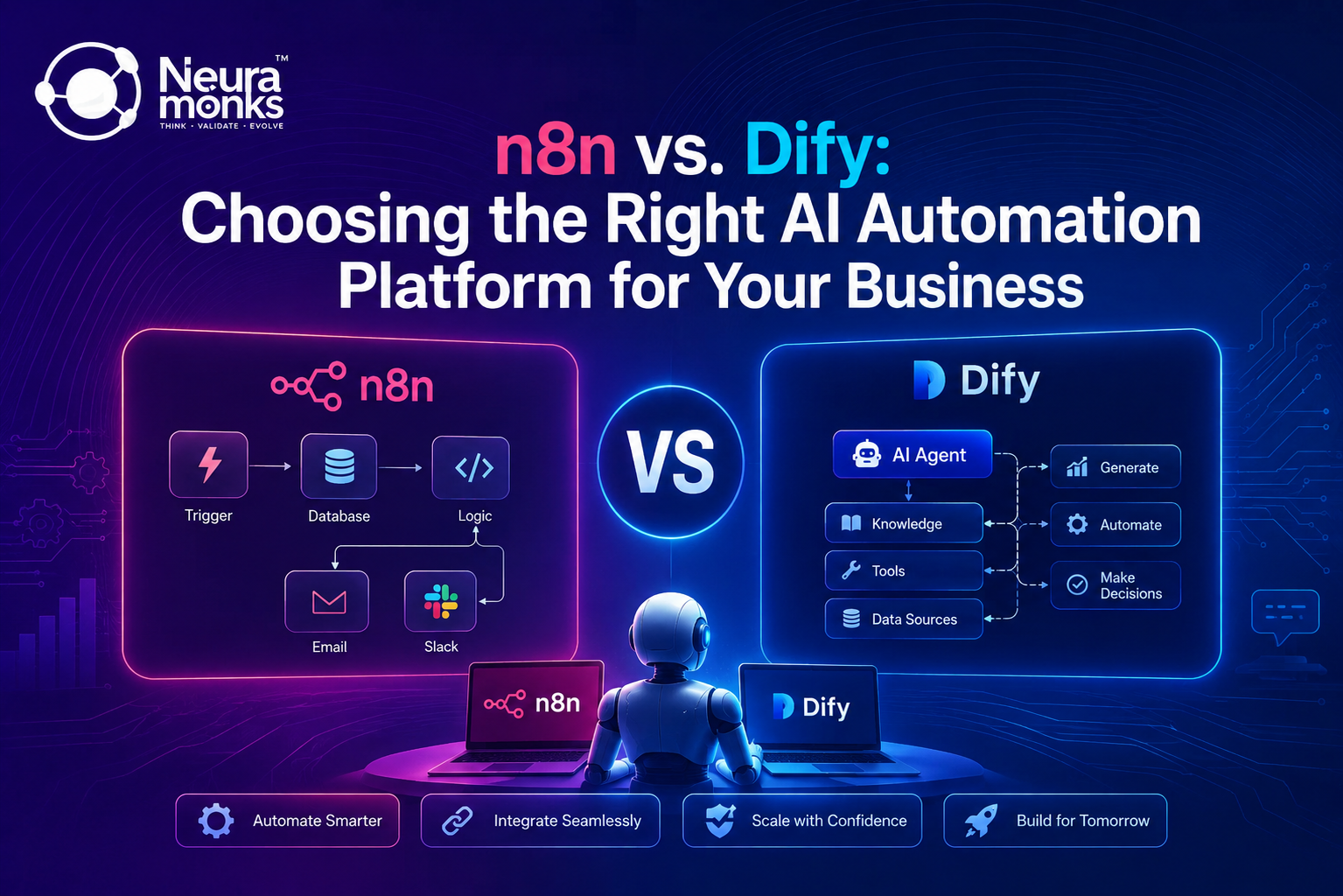
n8n automation suits teams that need deep system integration, self hosted control, and complex conditional logic across 500+ apps, while Dify fits teams building LLM-first conversational agents fast with a visual prompt-orchestration layer. Most enterprises evaluating both end up running a hybrid stack rather than picking one platform exclusively.
Picking an automation platform usually begins with the wrong question. Business teams ask “which tool is better,” when the real question is “which tool matches what my team is trying to ship in the next 90 days.” A logistics company automating vendor emails and ERP updates has different needs than a support team building a customer-facing chatbot with memory. n8n and Dify were built to solve different problems first, and that difference shows up the moment real workflows hit production traffic.
This comparison breaks down where each platform holds up, where it strains, and what the switching costs actually look like once a pilot moves past the demo stage.
RELATED READ
How to Deploy Production Grade Agentic Workflows Using n8n and Gemini (Enterprise Implementation Guide) a step-by-step build guide for teams that have already decided n8n fits their integration layer.
What n8n Actually Handles
n8n is a workflow orchestration tool built around nodes: triggers, actions, conditionals, and loops connected on a visual canvas. It ships with over 500 pre-built integrations covering CRMs, ERPs, databases, and messaging platforms, and it supports custom JavaScript or Python inside Function nodes when a pre-built node cannot cover an edge case.
Three things make n8n automation a stronger fit for operationally heavy businesses. First, self-hosting keeps data inside a company’s own infrastructure, which matters for healthcare and finance teams under strict compliance rules. Second, the node-based canvas handles branching logic (if this, then that, unless X) more precisely than prompt-based orchestration. Third, workflows are portable JSON files, so a workflow built today can move between environments without vendor lock-in.
The tradeoff: n8n’s strength in system integration is not matched by native language-model orchestration. Connecting an LLM requires an HTTP node, manual prompt construction, and custom logic to parse and route the model’s response. Teams get full control, but that control comes with more engineering hours before an agent goes live.
What Dify Actually Builds
Dify takes a different position from the first line of a build. It is a visual platform purpose-built for LLM applications: prompt orchestration, retrieval-augmented generation, agent workflows, and conversation management are first-class features, not add-ons bolted onto a general automation tool. A team can connect a model provider, define a system prompt, attach a knowledge base, and have a working chatbot live within a day.
Working with a Dify AI Development Company typically means faster time to a working prototype. Dify’s built-in RAG pipeline handles document chunking, embedding, and retrieval without custom code, and its agent framework supports multi-step reasoning with tool calls out of the box. For customer support bots, internal knowledge assistants, and content generation tools, this shortens the build cycle from weeks to days.
The tradeoff runs the other direction from n8n. Dify’s integration library is narrower than n8n’s, and workflows that need deep, multi-step logic against internal business systems (ERP updates, multi-table database writes, conditional approval chains) require more custom development inside Dify than they would inside a dedicated automation tool. A Dify implementation partner typically pairs its agent logic with an external integration layer to close this gap.
n8n vs. Dify: Side-by-Side Comparison
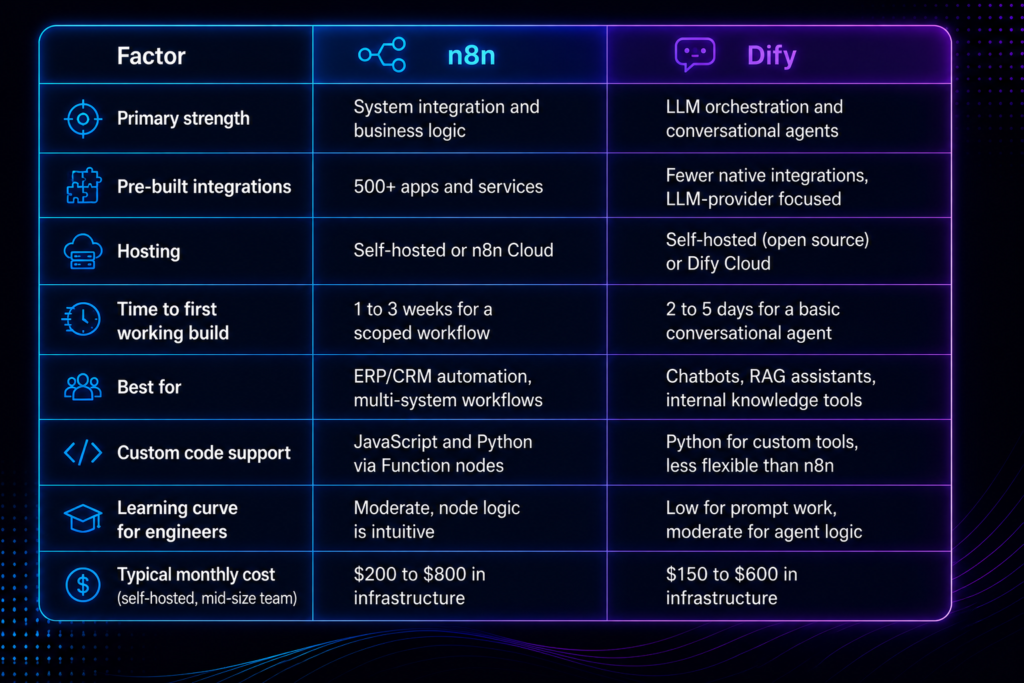
The table below reflects the practical differences that show up once a pilot moves toward production, not just the marketing feature lists.
When n8n Wins the Decision
Three scenarios consistently favor n8n over Dify. A manufacturing team automating supply chain remediation across SAP, vendor emails, and IoT logs needs the integration depth and conditional branching that n8n’s node canvas provides. A construction firm syncing Procore data with zoning databases and BIM logs needs the same. A finance team that requires every workflow step logged, versioned, and auditable gets that natively from n8n’s execution history, something Dify’s conversation-first architecture was not built to prioritize.
When Dify Wins the Decision
Three scenarios favor Dify instead. A support team that needs a customer-facing chatbot answering from a 2,000-page knowledge base gets there faster with Dify’s built-in RAG pipeline than building retrieval logic manually in n8n. A marketing team producing content variations at scale benefits from Dify’s prompt-chaining interface, which is closer to how a copywriter thinks than a general workflow canvas. A product team validating an AI feature before committing engineering resources can prototype in Dify in days, then decide whether the winning pattern justifies a heavier custom build.
The Real Decision Problem
Most teams do not fail at choosing a platform. They fail at scoping the workflow before choosing one, which means the platform gets picked based on demo appeal rather than production fit. Three patterns explain most failed pilots on either platform.
- Undefined data boundaries: teams begin building before mapping which systems the workflow needs to read from and write to, then discover mid-build that neither platform has a native connector for a legacy system.
- No iteration ceiling: agentic workflows without a hard cap on reasoning loops rack up token costs and occasionally loop indefinitely, a problem equally common in n8n’s Function-node loops and Dify’s agent chains.
- Missing ownership after launch: a workflow built by one engineer with no documentation becomes unmaintainable the moment that engineer moves to another project, regardless of which platform hosts it.
Fixing these three issues before development begins matters more than the platform choice itself. A scoped two-week discovery phase, covering data sources, iteration limits, and a documented handoff plan, prevents most of the rework that makes teams regret their platform pick six months later.
Cost Comparison Beyond the Sticker Price
Sticker price is not the real cost driver in either platform. n8n’s self-hosted tier is free for the software, but infrastructure (hosting, Redis for queue mode, PostgreSQL, monitoring) typically runs $200 to $800 per month for a mid-size team, plus engineering hours to build and maintain workflows. Dify’s self-hosted option follows a similar infrastructure cost, generally $150 to $600 per month, with the savings coming from a shorter build cycle for LLM-specific use cases rather than lower hosting costs.
The bigger cost variable is engineering time. A single n8n workflow covering a moderately complex integration (three to five systems, conditional logic, error handling) takes an experienced engineer roughly 40 to 80 hours to build and harden for production. A comparable Dify agent for a conversational use case typically takes 20 to 40 hours, largely because RAG and conversation memory come pre-built rather than custom-coded.
Why Most Enterprises End Up Running Both
The either/or framing breaks down once a company has more than two or three automated processes running. A healthcare provider might use n8n to sync EHR records and route prior authorization data across HL7/FHIR endpoints, while running a Dify-built patient-facing chatbot for appointment questions on top of the same data layer. Neither platform replaces the other; each handles the half of the problem it was built for.
CASE STUDY: NEURAMONKS
Neuramonks, a Dify AI Development Company, built a custom Gemini provider plugin for Dify that lets enterprise clients route agentic workflows through an approved, org-level LLM integration, bypassing Dify’s default model restrictions while keeping the same visual builder clients already trained their teams on. The same client’s ERP synchronization and vendor communication workflows run on n8n, connected to the Dify agent layer through a shared data store.
Read the full Dify enterprise implementation breakdown
This pattern, Dify for conversation and reasoning, n8n for system integration and business logic, shows up across manufacturing, healthcare, and construction clients working with Neuramonks. Neuramonks scopes the data flow first, then assigns each piece of the workflow to whichever platform handles it with the least custom code.
Making the Call for Your Business
Three questions settle most n8n versus Dify decisions faster than a feature comparison. Does the workflow primarily move data between existing business systems, or does it primarily generate conversational or written output from an LLM. Does the team have engineers comfortable writing custom integration code, or does the team need a platform that handles retrieval and prompt logic natively? Does the use case need to scale to five or more coordinated agents, in which case a hybrid architecture usually outperforms either platform running alone?
An AI automation agency evaluating both platforms for a client typically runs a two-week technical audit before recommending either, mapping data sources, compliance requirements, and the actual reasoning complexity the use case demands, so the resulting AI Solutions match the business problem instead of the platform’s default template. That audit, not a feature checklist, is what determines whether n8n, Dify, or a combination of both gets the workflow into production without a rebuild six months in.
Map the Workflow Before Picking a Platform
The n8n versus Dify decision matters less than most vendor comparisons suggest, because the businesses getting real returns from AI automation are rarely locked into one tool. They begin by mapping the actual data flow and decision points in a workflow, then match each piece to the platform built for it. Generative AI Development moves fastest when the platform choice follows the use case instead of forcing the use case to fit whichever platform got picked first.
Neuramonks works across both stacks daily, building n8n automation for system-heavy workflows and partnering as a Dify AI Development Company for conversational and RAG-first builds, often combining both inside a single client architecture. For teams deciding between the two, a short technical audit covering data sources, compliance needs, and reasoning complexity settles the question faster than any platform comparison can.
Book a Free AI Automation Consultation with Neuramonks